
How to nurture leads who've received your Branded Booklet
Your Lighter Side booklets include a series of pre-written follow-up emails designed to help you stay in touch with leads after they request a booklet. 📩
You can copy these emails into your preferred email platform or CRM, personalize them, and send or schedule them over time.
⚠️ Important: Lighter Side does not automatically send the follow-up email series. You'll need to send or schedule these emails using your own email platform or CRM.
In this Article
- Where to find your follow-up emails
- How to send the follow-up email series
- How often to send follow-up emails
- Tips for personalizing your emails
- FAQs
📬 Where to Find Your Follow-Up Emails
Each booklet includes its own series of pre-written follow-up emails.
To find them:
- Log in to your Lighter Side account.
- Navigate to the booklet your lead received.
- Click Lead Generation.
- Select Follow-Up Emails.
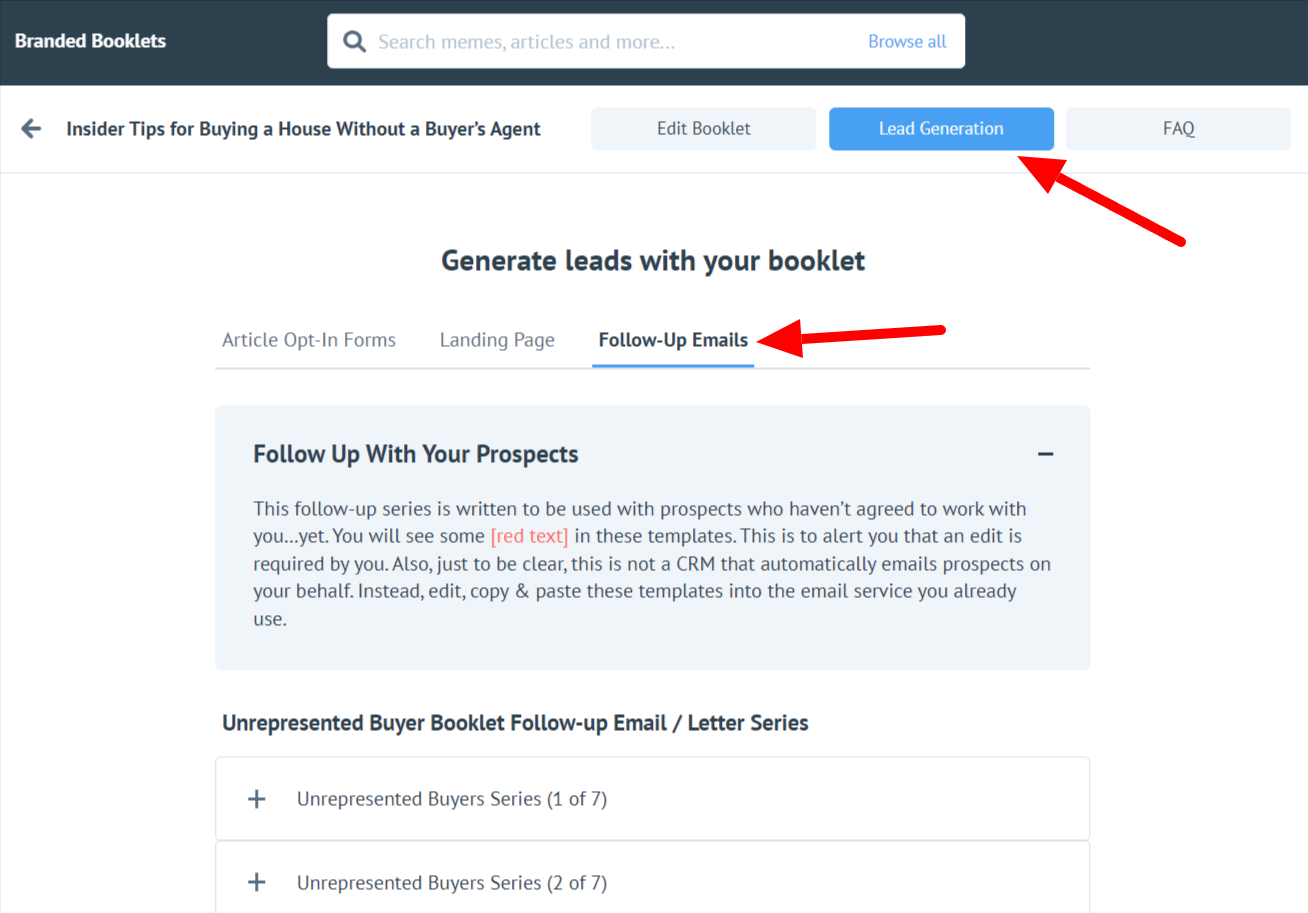
You'll find the pre-written email templates for that booklet here.
✉️ How to Send the Follow-Up Email Series
Once you've located the follow-up emails, you'll need to copy them into your preferred email platform or CRM.
Here's how:
- Open your email platform or CRM and create a new email or campaign.
- Add the lead's email address as the recipient.
- Return to Follow-Up Emails in your Lighter Side account.
- Select the first email in the series.
- Copy the provided subject line and paste it into your email.
- Copy the email body and paste it into your email.
- Review the email and add any personalization you'd like.
- Send the email or schedule it for later.
Repeat this process for each additional email in the follow-up series.
⏰ How Often Should I Send the Follow-Up Emails?
We recommend spacing the emails approximately 2–3 days apart.
This allows you to stay on the lead's radar without sending the entire follow-up series at once.
If your email platform or CRM supports scheduled emails, you can set up the series in advance. Otherwise, you'll need to return and manually send each email.
✨ Tips for Personalizing Your Follow-Up Emails
The provided emails give you a starting point, but adding a personal touch can make your follow-up feel more natural.
Consider:
- Personalizing the message: Reference something you know about the lead, such as their location or interests.
- Including a clear next step: Invite the lead to schedule a consultation, visit your website, or take another relevant action.
- Considering timing: Keep the lead's time zone and typical working hours in mind when scheduling emails.
- Tracking results: If your email platform offers tracking, you can use its reporting features to monitor things like opens and clicks.
FAQ
Does Lighter Side automatically send the follow-up emails?
No. The follow-up email series is provided as pre-written content for you to use. You'll need to copy the emails into your own email platform or CRM and send or schedule them yourself.
Where can I find the follow-up emails for a booklet?
Open the booklet in your Lighter Side account and go to Lead Generation → Follow-Up Emails.
Are the follow-up emails the same for every booklet?
Each booklet has its own follow-up email series. Make sure you're using the emails associated with the specific booklet your lead received.
Can I edit the follow-up emails before sending them?
Yes. You can personalize the provided email content after copying it into your email platform or CRM.
How far apart should I send the emails?
We recommend sending the follow-up emails approximately 2–3 days apart.
Can I schedule all of the follow-up emails at once?
If your email platform or CRM allows you to schedule emails or campaigns, you can use those features to schedule the follow-up series. Lighter Side itself does not automatically send or schedule these follow-up emails.